Product Update #2: Introducing Document Intelligence
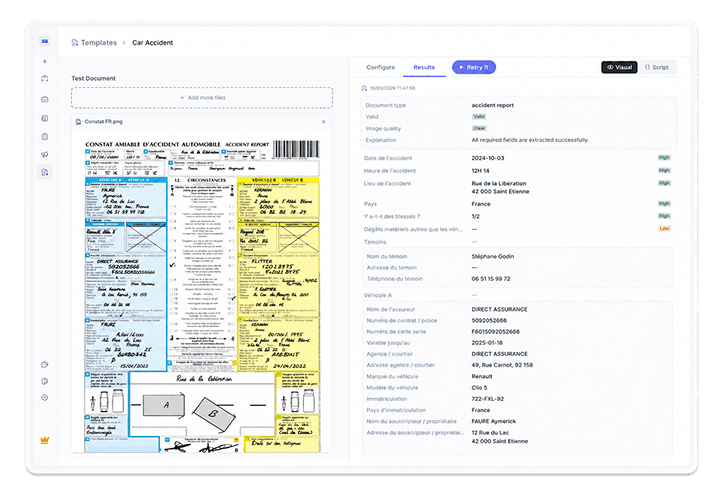
Every case has documents attached to it. Invoices, statements, ID cards, certificates, signed contracts. The information your team needs is already on the page. Getting it into the case still costs time and attention.
Document Intelligence removes that step.
Define the fields you need from a document type once. From that moment on, every document of that type that arrives in a case is read by Penbox, validated, and turned into structured data that flows directly into your case schema.
This is the same engine already powering document analysis at Revolut, Ethias, and many others, across documents as varied as multi-page legal contracts and handwritten "constats d'accident". It handles text, numbers, dates, lists, and repeating structures like line items, which come back as typed arrays. Every field returns with a confidence score, so high-confidence values flow through automatically, and lower-confidence ones route to a human with the source page already pinpointed.
Building a template is dead simple. Drop a sample document into the editor and describe the fields you want. Penbox runs the template on the document in front of you and shows you exactly what comes back. Adjust the rules, add a validation, test again. A few minutes later, you have a template ready to handle every document of that type your workspace will ever receive.
Templates
A Document Intelligence template holds your extraction fields and validation rules in one place. The visual editor lets you define them, run them on a real document, and verify the output before the template touches a live case. Validation rules are written in plain language, so "reject if the document is not what we expect" or "reject if the date is older than 3 months" become conditions Penbox enforces before extraction runs. Wrong documents never reach your team.
Live in your cases
Attach a template to a file element inside any case template, map the extracted fields to your case data schema, and extraction runs the moment a document lands. Values populate automatically. The case moves forward without manual entry.
The same template works everywhere. Reference it by ID through the Connect API, attach it to multiple case templates, reuse it across onboarding, claims, renewals, or any process that touches the same document type. Define once, use everywhere.
Confidence and review
Every extracted field comes with a confidence score grounded in the model's certainty and your validation rules. You decide the threshold. Above it, values flow straight into the case. Below it, the case routes to a reviewer with the document open, the field highlighted, and the extracted value ready to confirm or correct. Your team reviews exceptions, not every document.
Availability and pricing
Document Intelligence is available in every workspace today, included at no additional cost as we refine and expand the product. High-volume extraction may move to usage-based pricing in the future; we'll provide clear advance notice before any change takes effect. Reach out if you have any questions.
Where to start
Frequenty Asked Questions
What is Document Intelligence? Document Intelligence is a Penbox feature that automatically reads documents arriving in a case, extracts the fields you care about, and puts structured data directly into your case schema. You define the fields once; from that point on, every document of that type is processed automatically without manual data entry.
What document types does it support? It works on invoices, ID cards, bank statements, contracts, and administrative forms, including handwritten documents like "constats d'accident." It handles text, numbers, dates, and repeating structures like line items.
What is a Document Intelligence template? A template holds your extraction fields and validation rules in one place. You define what fields to pull out, what types they are (text, number, date, or list), and what makes a document valid. You can test the template on a real document inside the editor before it touches any live case. Guide: Build your first template.
How does validation work? You write validation rules in plain language, for example: "reject if the document is older than 3 months." Penbox checks the document against those rules before extraction runs, so wrong or irrelevant documents never reach your team.
What happens when a field has low confidence? Every extracted field comes with a confidence score. You set the threshold. Fields above it flow straight into the case automatically. Fields below it route to a reviewer with the document open, the field highlighted, and the extracted value ready to confirm or correct. Your team only handles exceptions.
Can I reuse a template across multiple case templates? Yes. You define the template once and attach it to as many case templates as you need. You can also call it by ID through the Connect API. It works the same way whether it is used in onboarding, claims, renewals, or any other process that touches the same document type. Guide: Use a template in a case.
Does Document Intelligence cost extra? Not right now. It is included in every workspace at no additional cost while Penbox refines and expands the product. High-volume extraction may move to usage-based pricing in the future, and Penbox will give clear advance notice before any pricing change.
Is Document Intelligence available via API? Yes. You can call POST /document_intelligence through the Connect API, send a document, define the fields to extract, and receive structured JSON back. API reference.