Product Update #3: Introducing Penbox Agent
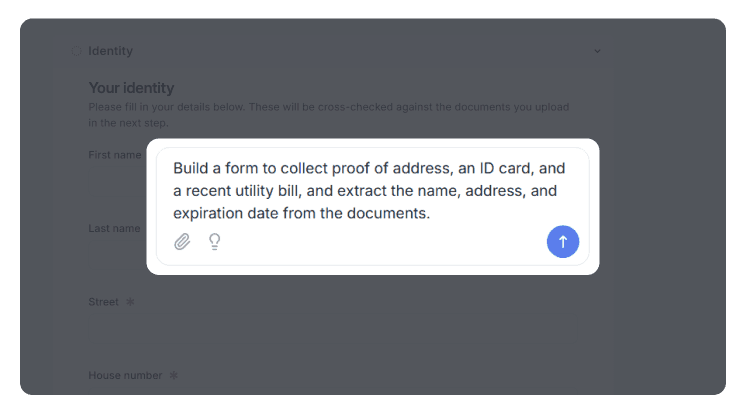
As automation accelerates, the hard part in case management is no longer processing the work. It is building the right forms, automations, and workflows fast enough to keep up.
Your workspace already has the tools you need. But using them means building everything yourself: forms, data fields, automations, and the logic that connects them. Penbox Agent changes that.
What is Penbox Agent?
Penbox Agent is an AI assistant built directly into Penbox. It understands your cases, forms, and templates. You can use it to build anything, summarize cases, get recommendations, and take action, all from a chat panel that sits next to wherever you are already working.
When you need to digitize a paper claim form, drop the PDF into the chat and ask Penbox Agent to reproduce it as a bilingual digital form. A few seconds later, every field is recreated with the right type, conditional sections are wired up, French and Dutch translations are filled in, and AI extraction is set up on the ID card upload. Ask it to send a confirmation email to the broker on submission, and it is done before you would have finished clicking through the editor.
"The result is generally quite mind-blowing."
What can it build?
Penbox Agent works across templates and live cases.
On form templates, it handles every field type, conditional logic, multilingual content, signatures, automations, and AI extraction on uploaded files. Drop a PDF or screenshot into the chat and it turns the document into a working digital form. One early user built ten forms in a single weekend, using the agent and the API to automate every request for missing documents his team would send out.
On case templates, it builds complete end-to-end workflows. It sets up the data structure, contact roles, and case steps, writes email and form invitations, configures conditional logic, adds custom statuses with automatic transitions, and keeps the case schema in sync with your form data. Describe a process in plain language and it builds the template.
On Document Intelligence templates, give it a description, a sample document, or an existing template to refine, and it sets up the extraction fields and handles the rest.
Working on live cases

Penbox Agent also works on cases already in progress. From the chat panel on any case page, you can ask what has happened in the case, draft emails, SMS messages or form requests, set data values, update the status, and add reminders, all without leaving the case.
Customer-facing teams get instant answers to questions they would normally have to hunt for: what the broker said in the last email, what the client agreed to, what is still missing.
"We are more in reality than in fiction here. This is the realisation of a dream: artificial intelligence applied to case management."
Safety and control
Every change Penbox Agent makes is shown live in the editor. Any change can be reversed. The chat panel sits next to the form editor, the case template editor, the Document Intelligence template editor, and every case page.
"It feels really smooth. And you can't really make a mistake."
Availability and pricing
Penbox Agent is now available in every workspace, included at no additional cost as we refine and expand the product. High-volume capabilities may move to usage-based pricing in the future. We will provide clear advance notice before any change takes effect. Reach out if you have any questions.
Frequently Asked Questions
What is Penbox Agent? Penbox Agent is an AI assistant built into Penbox. You interact with it through a chat panel and it can build and edit your forms, case templates, and Document Intelligence templates, as well as take action on live cases.
Where does the chat panel appear? The chat panel sits next to the form editor, the case template editor, the Document Intelligence template editor, and every case page. You do not have to leave the page you are working on.
What can Penbox Agent build on form templates? It handles every field type, conditional logic, multilingual content, signatures, automations, and AI extraction on uploaded files. You can drop a PDF or screenshot into the chat and it turns the document into a working digital form. Learn more about form templates.
What can Penbox Agent build on case templates? It sets up the full workflow: data structure, contact roles, case steps, email and form invitations, conditional logic, custom statuses with automatic transitions, and keeps the case schema in sync with form data. Describe the process in plain language and it builds the template. Learn more about case templates.
Can Penbox Agent work on a case that is already running? Yes. From the chat panel on any live case, you can ask what has happened, draft emails, SMS messages or form requests, set data values, update the status, and add reminders, without leaving the case.
Can I undo changes the agent makes? Yes. Every change is shown live in the editor and can be reversed.
Does Penbox Agent cost extra? Not right now. It is included in every workspace at no additional cost while Penbox refines and expands the product. High-volume capabilities may move to usage-based pricing in the future, and Penbox will give clear advance notice before any pricing change.